Expand GoHighLevel voice AI with Vapi, Retell and ElevenLabs.
GoHighLevel voice AI integration through VoiceAIWrapper gives your agency the freedom to expand beyond native GoHighLevel AI calling and chat by adding Vapi, Retell AI and ElevenLabs API keys.
The VoiceAIWrapper-GoHighLevel app is available in the GoHighLevel marketplace. All you need is a VoiceAIWrapper account . Inside VoiceAIWrapper, you can create AI calling and AI chat agents using the built-in AI engine or you can use Vapi, Retell and ElevenLabs API keys. You can then connect these agents into each GoHighLevel sub-account and offer white-label AI calling and chat right inside their GoHighLevel sub-account. You can set your own pricing for AI calling and AI chat services and the client portal for analytics and billing loads right inside their GoHighLevel sub-account.
Seven-day trial, card required. Your selected plan starts on day seven unless canceled. Review current plans and usage terms.

Keep contacts, workflows and calendars in GoHighLevel and use external providers like VoiceAIWrapper Native, Vapi, Retell or ElevenLabs for each client. Use VoiceAIWrapper’s AI Agent Builder to configure supported agents, connect calling campaigns and manage client access from one agency platform.
Explore the platform features for the broader agency workflow.
Expand your GoHighLevel offer. Retain control of your margins.
Choose external AI while keeping clients on GoHighLevel sub-accounts
Connecting VoiceAIWrapper with GoHighLevel gives you the freedom to use any external provider of your choice - VoiceAIWrapper, Vapi, Retell, ElevenLabs and offer voice AI calling and AI chat services to your GoHighLevel sub-accounts for a profit. You can connect any VoIP telephony of your choice and use for uncapped AI voice minutes or AI chat minutes - usage is billed based on actuals. Connect automation workflows from n8n, Zapier or Make using webhooks.
Sell voice and chat under your own brand
VoiceAIWrapper allows you to white-label the whole system under your brand. Client portals are on your domain, client notifications come from your inbox and client payments are made to your Stripe account. Control what your clients get access to and customise the client portal to suit your audience type.
Expand the scope of your service
VoiceAIWrapper allows you to create branded client portals in multiple languages and bill clients in a currency of your choice. Create Inbound AI receptionists or AI outbound calling agents based on your use case.
Pay for provider usage at the provider’s rates
Connect your own provider account and pay the provider directly for actual usage under its pricing terms. VoiceAIWrapper charges a flat monthly subscription fee and you pay for AI usage based on actuals.. This gives you a clear cost base for pricing each client’s service.
Your margin depends on what you charge minus provider usage, payment-processing fees, platform and account costs, and delivery costs. More control over those inputs helps you design a profitable offer.
Watch the integration setup

GoHighLevel AI: Run Voice Agents Inside Client Sub-Accounts
In this 4-minute, 19-second walkthrough, Raj Baruah shows the provider connection, private portal embed, calendar tools and workflow actions. Published September 17, 2026. The video shows where to configure the integration.
Watch on YouTube: provider connection at 0:49, portal embedding at 1:43, calendar tools at 2:48, and workflow actions at 3:04.
Choose the provider that fits your client’s offer
All provider paths use the same agency connection and sub-account mapping. You can use our buil-in AI engine or start with the provider you already use.
Reach out to our team on our support chat to help you set this up or Explore the Retell AI white-label workflow.
Reach out to our team on our support chat to help you set this up or read the ElevenLabs white-label guide.
Reach out to our team on our support chat to help you set this up or See the Vapi white-label setup .
Setting up your first GoHighLevel client sub-account
1. Connect the agency
Install the VoiceAIWrapper marketplace app and finish connecting when you sign in or sign up. You can also connect from Organization Settings → Integrations in VoiceAIWrapper. A workspace owner or admin must manage this connection.
2. Map the sub-account
Open Manage sub-accounts and match the installed GoHighLevel sub-account to its VoiceAIWrapper client and workspace.
3. Add the campaign workflow action
In the mapped GoHighLevel sub-account, add Add Lead to Voice Campaign to your workflow. Choose the campaign, provide any merge variables as key=value lines, and choose whether the call updates the contact afterward.
Use Update Campaign Status to start, pause or end a campaign. Update Lead can change a lead’s state or request another attempt. For the wider campaign workflow, see AI outbound calling.
4. Configure calendar booking
Supply the calendar’s Private Integration Token, sub-account Location ID and business timezone, then select the calendar. Note : Agency connection and calendar configuration are separate steps.
Verify availability and a test appointment before expanding your AI appointment-setting workflow.
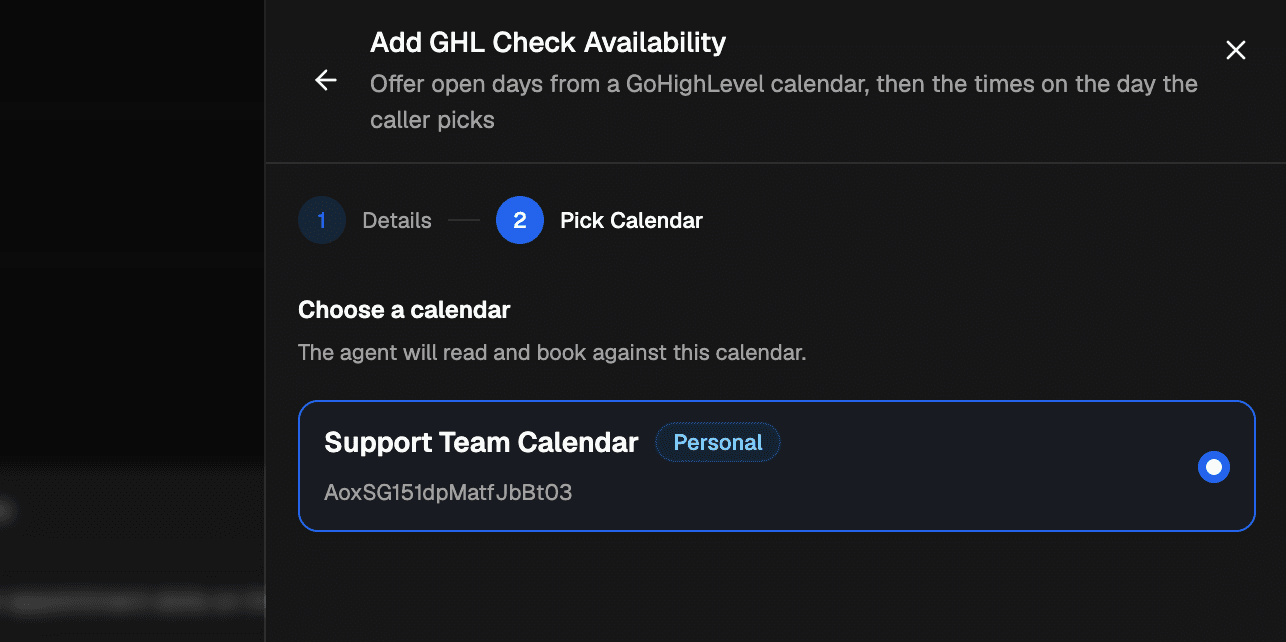
Select the calendar after entering the Private Integration Token, Location ID and timezone.
5. Embed the client portal
After the client user sets their password, choose Generate Embed URL on that user. Register the domain that will display the portal, then add the generated URL through GoHighLevel’s Custom Menu Links.
Keep the user-specific link private. It works only on its registered domain, and removing that domain revokes the embed’s access. Test access as the intended client user.
6. Check the result before rolling out
Run a controlled test with a contact you are authorized to call. Verify the selected campaign, contact updates, calendar booking and client access. Repeat the check for each provider configuration you intend to use.
Follow the first client sub-account community walkthrough for the setup checklist.
Put the call result back on the contact
For calls to leads originating in GoHighLevel, the integration documents a contact note containing the summary, transcript and recording link. It also writes an outcome tag and creates AI Call fields such as Outcome, Sentiment, Duration, Summary and Extracted Data.
The documented outcome tags are vaw-answered, vaw-no-answer and vaw-voicemail, with vaw-do-not-call when the caller asks. Use the recorded result to decide what your next workflow step should do, and verify the writeback setting during setup.
Controls worth checking before your first campaign
No lead is appearing? Check the sub-account mapping and selected campaign first. Unmapped accounts are ignored.
Booking goes to the wrong place? Check Location ID, timezone and the selected calendar. Each agent supports one booking calendar.
Portal access fails? Check that the user has set a password and that the embedding domain is registered.
Need to stop calling without losing the record? Use Update Lead with do not call. Remove Lead also deletes that lead’s call history.
Contact is marked do-not-contact? The documented integration prevents it from being added and stops calling its leads if the mark is added later. Test this control alongside your own calling rules.
Note : Disconnecting the agency removes the app from its sub-accounts and clears mappings.
When this does not fit
This route fits agencies that want more provider choice, branded voice and chat services, and control over client pricing. It adds provider configuration and account mapping to your operating setup. Provider, telephony and platform limits still apply.
If you want to run only GoHighLevel’s own native Voice AI, assess that workflow directly. Integration behavior does not replace your agency’s responsibility for permissions, calling rules and testing.
GoHighLevel voice AI questions
Is this GoHighLevel’s native Voice AI?
No. This page describes external voice providers connected through VoiceAIWrapper’s native GoHighLevel integration. GoHighLevel’s own Voice AI is a separate product workflow.
Can I connect Retell, Vapi and ElevenLabs to GoHighLevel?
Yes, the documented VoiceAIWrapper setup supports these provider paths. Calendar booking is available through the AI Agent Builder for all three. Standalone GoHighLevel tools are documented for Vapi and ElevenLabs.
Do I need calendar credentials after connecting the agency?
Yes. Calendar setup requires a Private Integration Token, Location ID and business timezone, followed by calendar selection. Connecting the agency does not complete this step.
Which plan includes the integration?
Provider access, chat and portal embedding depend on your selected plan. Check current pricing for plan details and usage charges.
Can clients use the portal inside their sub-account?
Yes. Generate a user-specific embed URL after the user sets their password, register the domain and add the link through Custom Menu Links. Keep that URL private.
Seven-day trial, card required. Your selected plan starts on day seven unless canceled. Provider usage is billed separately. Confirm provider, chat and portal availability on your selected plan.
Implementation source: native integration release notes. Video presenter: Raj Baruah, founder of VoiceAIWrapper. About VoiceAIWrapper. Explore other voice AI use cases.