
Vapi White-Label for Your Agency: The 60-Minute Setup Guide (2026)

Vapi White-Label for Your Agency: The 60-Minute Setup Guide (2026)

If your agency already runs Vapi for clients, VoiceAIWrapper's white-label platform adds the business layer Vapi does not ship: branded client portals, sub-account isolation, markup billing in 10 currencies, and Stripe rebilling. You connect your Vapi API key once; your agents sync automatically; your first client can go live in under 60 minutes.

Hero banner showing Vapi and VoiceAIWrapper integration for white label voice AI agencies in 2026 | VoiceAIWrapper.

|

Published:

|

Updated:

On this Page


WHERE EACH PLATFORM WINS

If you are evaluating VoiceAIWrapper, there are real cases where another platform serves you better. Direct Vapi suits solo developers who need code-level control and have no plans to resell under a different brand. Retell has shipped lower median latency than Vapi in independent third-party benchmarks, useful for single-provider deployments where milliseconds matter. Where VoiceAIWrapper wins: the only platform that white-labels all 5 conversational agent platforms in one account (Vapi, Retell, ElevenLabs Agents, Bolna, Ultravox), Stripe rebilling on Growth at $79/mo, 10 billing currencies, 60-minute setup, and a signed BAA for HIPAA-covered clients on Pro.
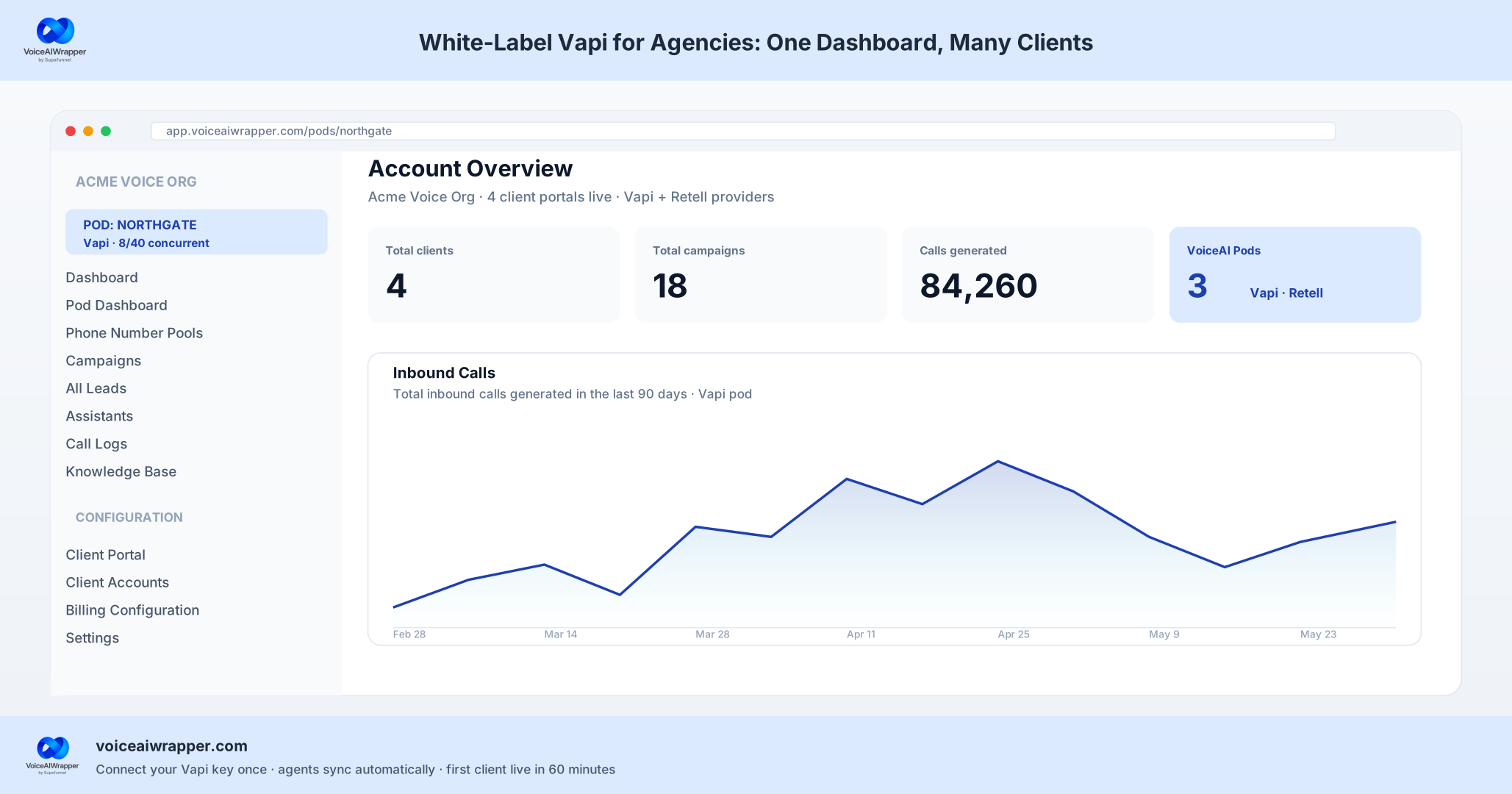
VoiceAIWrapper admin dashboard with the Northgate Vapi pod active in the left sidebar pod selector. Account Overview shows four total clients, eighteen campaigns, 84,260 calls generated, and three Vapi-Retell pods running. Inbound calls chart spans the last ninety days for the Vapi pod.
#The Agency Problem

Why agencies running Vapi standalone hit a ceiling

Vapi is an excellent conversational agent platform. The developer experience is strong, the feature set is broad, and it runs 10 concurrent calls by default with simple add-on pricing for more capacity. (Understanding Call Concurrency), Verbatim: "Every Vapi account includes 10 concurrent call slots by default.). The issue is not Vapi. The issue is what Vapi does not ship: a business layer.

When an agency takes on a second, third, or fifth client running Vapi voice agents, three friction points compound weekly:

1

The markup spreadsheet

Vapi bills the agency at its published per-minute rate. The agency marks it up, invoices the client, tracks usage against their own rate, and reconciles the difference. With 3 clients this is manageable. With 12 it is a weekly accounting job that earns nothing.

What changes: VoiceAIWrapper's markup billing engine handles this automatically. You set the per-minute rate you charge clients; the platform bills the spread.

2

The portal problem

Clients want to see call logs, agent performance, and their own usage. Sharing direct Vapi dashboard access means sharing access to your other clients' data, your API keys, and your pricing. Building a custom portal is a full engineering project.

What changes: VoiceAIWrapper creates an isolated sub-account for each client with toggled visibility on exactly what they can see.

3

The billing disconnect

Most agencies are collecting payment via Stripe manually, outside Vapi entirely. The invoice, the reminder, the subscription renewal, and the currency conversion are all separate workflows that do not talk to each other or to the client's actual usage data.

What changes: Stripe rebilling is available on Growth at $79/mo . Clients pay the agency in their currency, on the billing frequency the agency sets.

4

The provider ceiling

Clients ask for specific voice characteristics, language support, or agent architectures. One provider does not satisfy every vertical. Adding a second provider (say, ElevenLabs Agents for multilingual work, or Retell for latency-sensitive inbound) means maintaining separate credentials, separate dashboards, and separate billing for each.

What changes: VoiceAIWrapper runs all 5 providers in one account. Compare all alternatives side by side.


#Architecture Canon

What VoiceAIWrapper actually adds on top of Vapi

VoiceAIWrapper is not an agent builder. Agents are configured inside Vapi's own platform. When you connect your Vapi API key to VoiceAIWrapper, every agent, assistant, workflow, squad, tool, knowledge base, and phone number syncs automatically into your VoiceAIWrapper pod. No manual mapping. No second prompt to maintain.

Raj Baruah, Founder at VoiceAIWrapper: "VoiceAIWrapper does not have squad tools or knowledge base. They don't need to. These are features that already exist in the underlying voice provider like Vapi. And whatever exists in Vapi automatically syncs with VoiceAIWrapper; we do not have to duplicate what is already in Vapi. It's synced and available to white label."

See VoiceAIWrapper's feature set for the full list. The table below draws the line clearly.

CAPABILITYVOICEAIWRAPPER-NATIVEVAPI-NATIVE (SYNCS INTO VOICEAIWRAPPER)
BUSINESS LAYER
Markup billing engineYes, agency sets client price, captures spreadNo
Sub-account isolationYes, one portal per end-clientNo
Stripe rebillingYes. Growth plan+No
10 billing currenciesUSD, EUR, GBP, AUD, CAD, SEK, BRL, SGD, RUB, CHFNo
4 billing frequenciesDaily, weekly, monthly, yearlyNo
White-label subdomainkeyword.youragency.comNo
CAMPAIGN OPERATIONS
Programmatic outbound campaignsYes, step-by-step builder, retry logic, TCPA guardrailsBasic batch dialing only
Phone number pool routingYes, distributes calls across number poolNo
Smart callback schedulingYes, agent-heard "call me back at 3pm" auto-schedulesNo
Forwarding webhook URLYes, fans events to Zapier or custom backendServer URL only (single destination)
AGENT PLATFORM (CONFIGURED IN VAPI, SYNCED INTO VOICEAIWRAPPER)
Agents / assistantsSyncs from VapiConfigure in Vapi dashboard
Knowledge basesSyncs from VapiVapi-NATIVE
Tool calls / function callingSyncs from VapiVapi-NATIVE
Squads (multi-agent flows)Syncs from VapiVapi-NATIVE
Concurrent call limitMirrors Vapi setting (must match)10 default; increase via Vapi

ChatDash supports 3 providers vs VoiceAIWrapper's 5 . Synthflow runs a proprietary engine, not a multi-provider white-label .

Ready to see the setup yourself?

7-day free trial. Scale-tier access. No credit card. Your Vapi API key connects in under a minute.

No credit card required · Cancel anytime


#Step-by-step

The 60-minute setup: from Vapi API key to first client live

This is a real walkthrough, not a marketing summary. These are the exact screens an agency sees on a Tuesday morning. See demo video for the full picture.
Step 1

Sign up for a 7-day free trial

Go to Voiceaiwrapper Pricing Page , click "Start Free Trial." You land at the signup form. No credit card required. The trial defaults to Scale-tier access ($249/mo equivalent). Fields: business email, password, and a "Where did you hear about us?" dropdown. Trust strip visible on the signup screen: "Join 1,000+ agencies scaling their business with Voice" and "SOC 2 Type II · GDPR · HIPAA · TCPA compliant."

Step 2

The onboarding flow explains the model

After signup, you land at Voiceaiwrapper Onboarding . The hero headline reads: "Your complete Voice AI agency, under your brand." The subhead explains the three inputs you bring: your AI provider API keys, your brand and domain, and your Stripe account. Three outcomes are displayed on this screen: "Invisible to clients," "100% revenue (Payments land in your Stripe)," and "Voice + Chat in one cockpit."

Step 3

Choose your provider (Vapi is pre-selected)

The provider selector shows all 5 supported conversational agent platforms: Vapi (pre-selected), Retell AI, ElevenLabs, Ultravox (badge: "Outbound only"), and Bolna. The screen header reads: "Your keys. Your data. Your brand." The in-product tip: "You can later add multiple providers, and multiple organizations from the same voice provider." The screen shows a sample agency dashboard preview at with white-label navigation (Dashboard, Agents, Campaigns, Clients, Billing, Analytics) and sample metrics. Trust badges at the bottom of this screen: SOC 2 Type II, HIPAA Compliant, GDPR Compliant, TCPA Compliant, 99.9% uptime.

Step 4

After clicking Next on the provider selector, you see the "Configure VAPI" form with these six fields:

After signup, you land at Voiceaiwrapper Onboarding . The hero headline reads: "Your complete Voice AI agency, under your brand." The subhead explains the three inputs you bring: your AI provider API keys, your brand and domain, and your Stripe account. Three outcomes are displayed on this screen: "Invisible to clients," "100% revenue (Payments land in your Stripe)," and "Voice + Chat in one cockpit."

  • Vapi Organization Name , default "VAPI"; rename for internal labeling if you have multiple Vapi orgs
  • Vapi Organization ID . UUID format, found at Vapi
  • Vapi Private Key , masked input with eye-toggle to reveal
  • Vapi Public Key , masked input
  • Vapi Concurrency Limit , set this to match the limit in your Vapi org. Vapi's default is 10 concurrent call slots. In-product note: "Please make sure this value is same as in your Vapi.ai."
  • Use EU Domain toggle . Enable this if your Vapi organization is configured for an EU region.
Step 5

Click Connect: what happens in the next 60 seconds

VoiceAIWrapper validates the keys. If invalid, an error appears in-form. If valid, the sync runs. Everything from agents to Vapi assistants, to knowledge base, to tools, to phone numbers, everything is synced. Agency does not need to manually sync anything. Two additional things happen automatically:

  • The server URL on your Vapi organization updates to route call events through VoiceAIWrapper. You see a confirmation prompt before this change is applied.
  • If you have existing Zapier or custom webhook listeners, you can add them as a Forwarding webhook URL in campaign settings so they keep receiving events alongside VoiceAIWrapper.
Step 6

Land in the Pod Dashboard

After the sync, you arrive at the Pod Dashboard. The left sidebar shows the full structure of your Vapi pod.

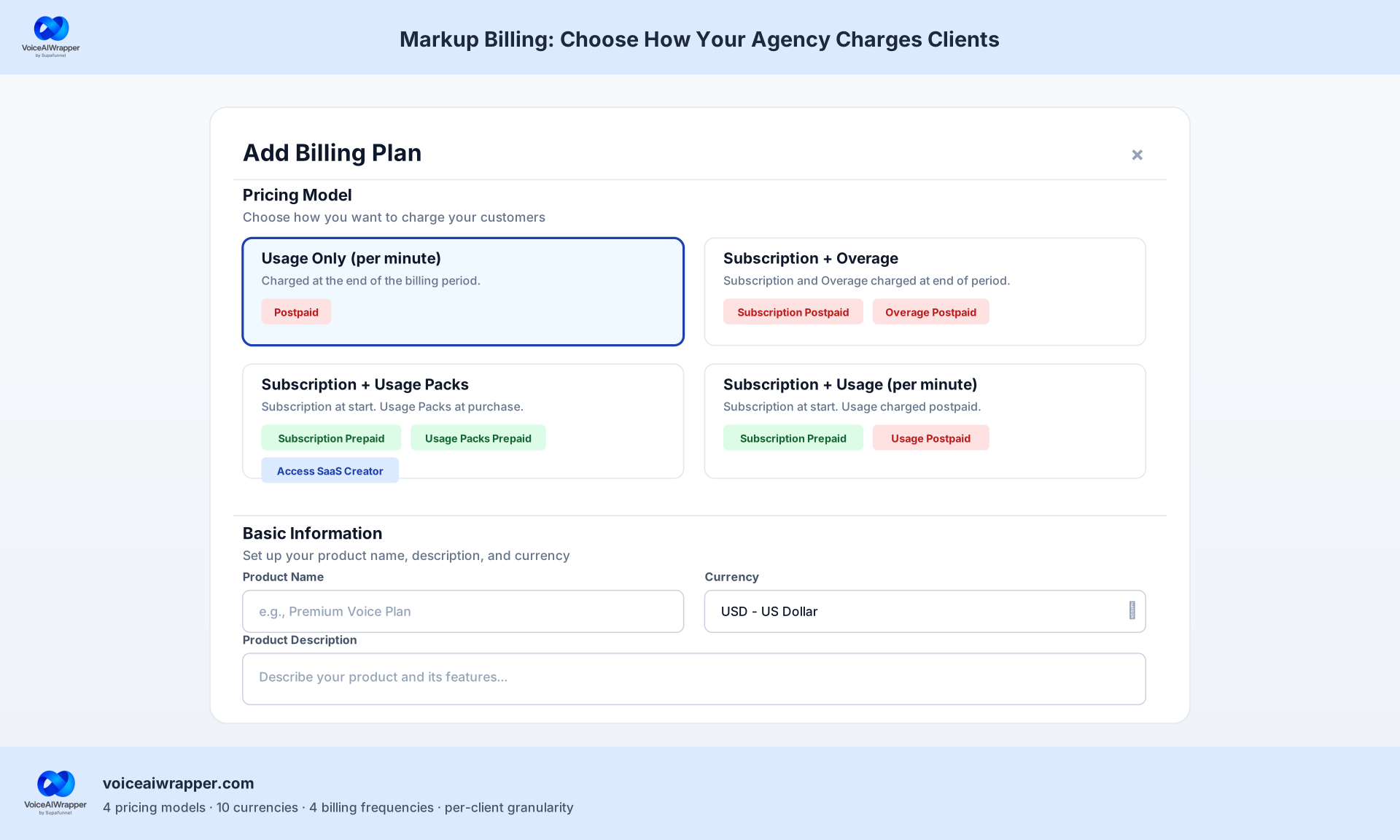
VoiceAIWrapper Add Billing Plan modal showing four pricing models: Usage Only per minute (selected as Postpaid), Subscription plus Overage (both Postpaid), Subscription plus Usage Packs (Subscription Prepaid plus Packs Prepaid plus SaaS Creator access), and Subscription plus Usage per minute (Subscription Prepaid plus Usage Postpaid). Basic Information panel has Product Name input, Currency set to USD, and Product Description text area.
Step 7

Configure markup billing

Navigate to Billing Configuration in the left sidebar. You decide which revenue lines to mark up: per-minute voice cost, subscription, overages, one-time setup fees, auto-recharging top-up packs, or AI chat. Any combination is valid. Tier access for billing: External billing (invoice export) is available on every plan including Starter. Stripe integration requires Growth ($79/mo). API-based billing is Pro-only ($499/mo). Multi-currency (10 currencies) and four billing frequencies (daily, weekly, monthly, yearly) are available on all paid tiers.

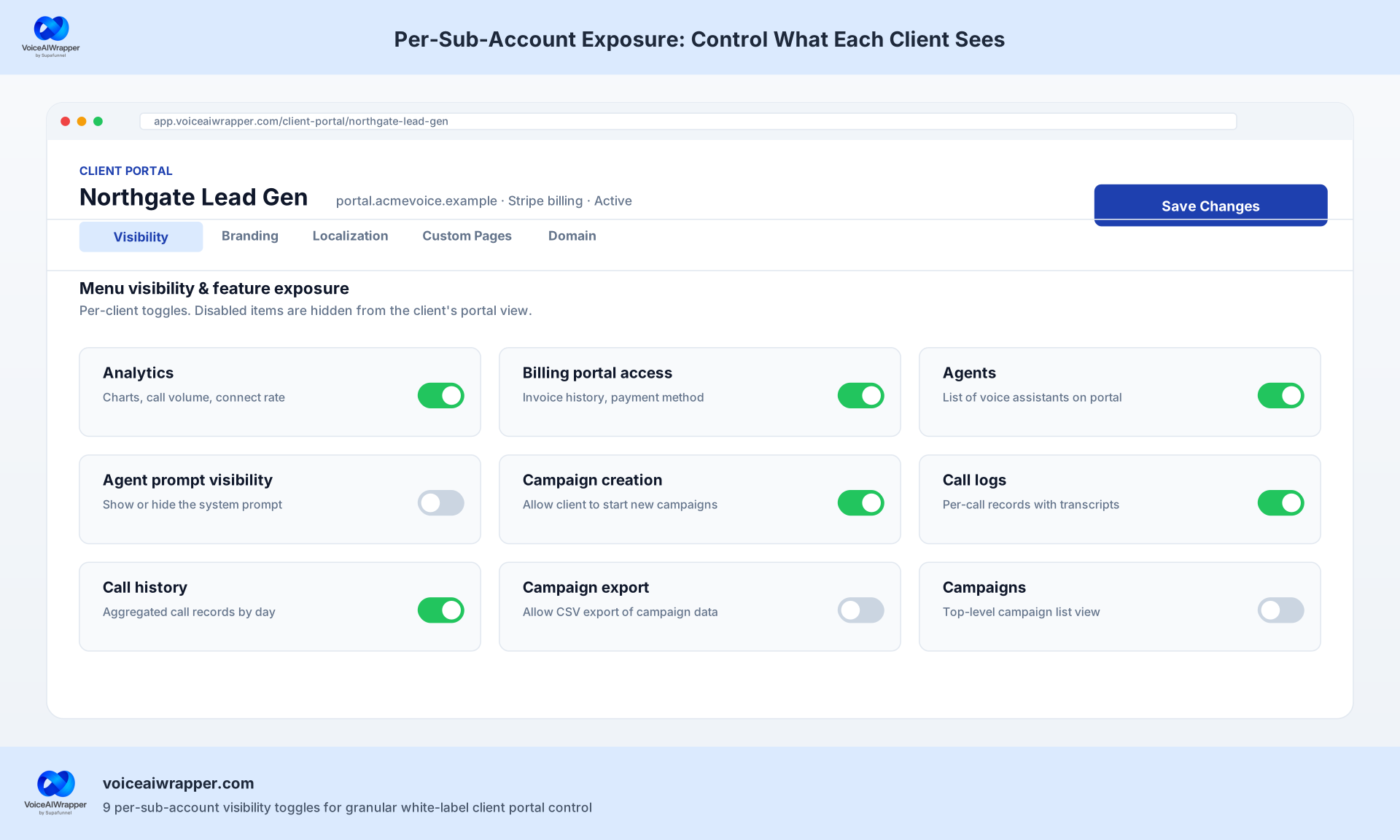
VoiceAIWrapper Client Portal configuration for Northgate Lead Gen showing nine per-sub-account exposure toggles: analytics, billing portal access, agents, agent prompt visibility, campaign creation, call logs, call history, campaign export, and campaigns. Six toggles are enabled and three disabled, demonstrating granular per-client visibility control for white-label agency deployments.
Step 8

Spin up a sub-account for an end-client

Navigate to Client Accounts in the left sidebar. Create a sub-account for each end-client. Each sub-account inherits the parent pod's Vapi connection but bills separately with its own currency and frequency settings.

Step 9

Set what the client sees in their portal

Navigate to Client Portal in the left sidebar. Per-sub-account exposure toggles control exactly what each client can access. Toggles available per sub-account: show/hide analytics, billing portal access, show/hide agents, show/hide agent prompt, allow/disallow campaign creation, show/hide call logs, show/hide call history, allow/disallow campaign export, show/hide campaigns.

Total time from Step 1 to here: "The full setup is within 60 minutes."

#Billing

The markup billing engine in depth

VoiceAIWrapper does NOT mark up Vapi voice minutes. Vapi bills your agency directly at Vapi's published rates. VoiceAIWrapper gives you the tool to set what you charge clients. The spread between Vapi's rate and your client-facing price is your margin.

What you can mark up (any combination)

  • Per-minute voice cost

  • Subscription (recurring platform fee you charge the client)

  • Overages (when usage exceeds a defined threshold)

  • One-time setup fees

  • Auto-recharging top-up packs (client pre-purchases blocks of minutes or credits)

  • AI chat (for agencies running the white-label chat widget alongside voice)


#Billing Tier Breakdown
PlanMonthlyBilling CapabilityCurrenciesFrequencies
Starter$29/moExternal billing only (invoice export, you collect payment off-platform)104
Growth$79/moStripe integration (rebill clients directly in-platform)104
Scale (Most Popular)$249/moFull markup engine + advanced access controls + white-label campaign API104
Pro$499/moAPI-based billing + signed BAA for HIPAA-covered clients + custom development104
#Side-by-side

Two comparison tables for 12-client agency math

Table 1: Direct Vapi vs Vapi via VoiceAIWrapper

Assumptions: 12-client agency, 2,000 minutes/month total usage, Growth tier ($79/mo), Stripe billing enabled. Vapi bills the agency directly for minutes at its Published Rate.

OPERATIONVAPI VIA VOICEAIWRAPPER (GROWTH $79/MO)VAPI STANDALONE
CLIENT BILLING WORKFLOW
Markup calculationAutomated per-client in-platformManual spreadsheet per client per month
Client invoicingStripe automated via platformManual Stripe invoice creation per client
Client portalIsolated sub-account per client, configurable visibilityNo native multi-client portal
Multi-currency billing10 currencies, per-client settingManual conversion and invoicing
PLATFORM COST AT 12 CLIENTS
Platform subscription$79/mo (Growth)No platform fee
Voice minute costPaid direct to Vapi (VoiceAIWrapper does not mark up)Paid direct to Vapi
Back-office time at 12 clientsNear zero (billing automated)Manual per-client billing reports and spreadsheet markup math
PROVIDER FLEXIBILITY
Providers supportedVapi + Retell + ElevenLabs Agents + Bolna + UltravoxVapi only
Multi-org supportMultiple orgs from same provider in one accountSeparate dashboards per org
TABLE 2: TIME TO FIRST CLIENT BILLED
API key connectionUnder 1 minuteN/A (already connected)
Branded portal liveSame session (60-min total)Custom dev project (days to weeks)
First client sub-accountWithin 60-min trial sessionManual setup outside Vapi
First automated invoice sentNext billing cycle after Stripe connectManual per client
HIPAA BAA signedPro tier ($499/mo) VoiceAIWrapper PricingNegotiate the HIPAA add-on directly with Vapi (separate annual contract; check Vapi for current pricing)


#Who This Is For

Three agency archetypes that use this setup

Archetype A

The vertical lead-gen agency

8-15 law firm clients running Vapi outbound for cold lead qualification and intake routing. Currently hand-billing each client via Stripe with manual usage reports and spreadsheet markup calculations. The VoiceAIWrapper markup engine and multi-currency billing eliminates the majority of back-office reconciliation and lets the agency raise per-minute client rates without renegotiating contracts each quarter.

  • VoiceAIWrapper value: automated billing at scale; no-rebuild when adding Retell or ElevenLabs for specific clients

Archetype B

The GHL automation agency

Already resells GoHighLevel sub-accounts to small businesses (dental, HVAC, real estate). Wants to add Vapi voice AI as a stickier add-on under the same agency brand. VoiceAIWrapper's pod and sub-account model maps directly onto the GHL sub-account model the agency already operates. The markup engine lets them stack a voice-AI monthly billing line on top of the existing GHL monthly billing line.

  • VoiceAIWrapper value: familiar sub-account model; one brand for all services

Archetype C

The solo-operator-to-SaaS transition

Freelancer who built one Vapi receptionist agent for a dental practice, charging a flat monthly retainer. Wants to productize the receptionist as a "Dental AI Receptionist" SaaS for 20-50 practices. VoiceAIWrapper turns the one-off retainer into a multi-client product: each practice gets its own sub-account, the receptionist agent syncs from Vapi, and the markup engine handles per-practice billing in their currency.

  • VoiceAIWrapper value: productization without custom infrastructure; SaaS Creator is available on Pro

When VoiceAIWrapper is NOT the right call

  • 1If you only need Vapi and have no plans to resell If your agency's entire business is running Vapi for yourself, with no end-clients needing a branded portal or recurring billing, Vapi standalone is cheaper and simpler. VoiceAIWrapper adds value when you have clients who need an isolated portal and automated billing. When you are the end-user of Vapi yourself, not the reseller, the $29/mo minimum on plans from $29/month adds no practical return.
  • 2If you have not shipped a Vapi agent yet VoiceAIWrapper is the productization layer for agencies that already know how to build Vapi agents. An agency owner should not pick VoiceAIWrapper when they are not technically savvy. They don't know how to create agents, have zero experience creating and selling voice agents. They need to learn this. VoiceAIWrapper is not going to teach them how to create agents. This is the second level of maturity, when they know how to create agents and now are ready to resell to their customers. If you have not yet built and shipped a Vapi agent end-to-end, do that first inside Vapi. Then come back.
  • 3If you are on a shoestring budget without a clear vertical The voice AI market is a heavily contested market. If you just have a hundred dollars to try out something for a few months, I would recommend not getting into the voice AI agency business. This would require you to understand the vertical that you're serving, would require you to put in time, effort, money, investment. People don't care about voice AI and AI as much as they care about their business outcomes. The agencies that win are the ones who understand the client's business deeply. Think of it like cold email: agencies who claim they generate leads but cannot explain the client's offer end up shipping spam. The voice AI version of that is shipping a generic agent that does not move the client's revenue or retention number. That is not a VoiceAIWrapper problem. That is a positioning and depth problem. Solve that first.


#Technical Precision

Two things to configure correctly: Call summary and server URL

These are the "Tuesday morning" details that trip up agencies after the initial setup.

The Call Summary naming convention

VoiceAIWrapper captures structured output from your Vapi calls, including the call summary. VAPI has a default structured output called 'Call Summary' that our system captures automatically.

What this means in practice: When you configure your Vapi assistant's structured output schema, name it exactly Call Summary (capital C, capital S). VoiceAIWrapper looks for this name when pulling the call analysis from Vapi's call.analysis.summary field (Vapi Docs). A differently named schema (e.g., "call_summary" or "CallSummary") will not be captured automatically.

The server URL update

When you click Connect, VoiceAIWrapper updates the server URL on your Vapi organization. This is how call events (status updates, end-of-call reports, tool calls) route through VoiceAIWrapper. A confirmation prompt appears before the change is applied.

Vapi's server URL is a standard webhook endpoint that receives POST requests during and after calls. If you have existing Zapier flows or custom backend listeners on your previous server URL, add them as a Forwarding webhook URL in VoiceAIWrapper campaign settings. Call events fan out to both endpoints simultaneously.

Any calls made outside of VoiceAIWrapper campaigns (for example, calls made directly on Vapi/Retell/ElevenLabs) will not be visible in call logs and will not be applicable in VoiceAIWrapper billing configuration. This is expected behavior, not a bug. Calls must originate inside VoiceAIWrapper campaigns to appear in your billing and reporting.

For more on optimizing your Vapi configuration for agency production deployment, see the Vapi performance optimization playbook .

Frequently Asked Questions

Question

How long does the Vapi integration take?

Answer

Under 60 minutes for a full agency stack: signup, provider connect, brand setup, and first client sub-account. The Vapi connection itself completes in under a minute once you paste your Vapi Organization ID, Private Key, Public Key, and Concurrency Limit. The bulk of the 60-minute budget is brand setup and configuring your first sub-account, not the integration.


Question

Does VoiceAIWrapper charge for Vapi voice minutes?

Answer

No. Vapi bills your agency directly at Vapi's published rates. VoiceAIWrapper does not mark up voice minutes. Instead, you set a markup price separately in the VoiceAIWrapper billing engine and charge your end-client whatever you choose. The spread between Vapi's rate and your client price is your agency's margin.


Question

What syncs from Vapi into VoiceAIWrapper after I connect?

Answer

Everything. Vapi agents and assistants, workflows, squads, tools, knowledge bases, and phone numbers all sync automatically into the VoiceAIWrapper pod. No manual mapping. The server URL on your Vapi organization is also updated to route call events through VoiceAIWrapper; we show a confirmation prompt before making the change.


Question

Can I run Vapi and Retell side-by-side?

Answer

Yes. VoiceAIWrapper supports five conversational agent platforms in one account: Vapi, Retell, ElevenLabs Agents, Bolna, and Ultravox. You can also connect multiple organizations from the same provider, which is useful for isolating client environments or running separate billing pools.


Question

What about my existing Vapi webhook integrations (Zapier, custom backend)?

Answer

Add them as Forwarding webhook URLs in the VoiceAIWrapper campaign settings. Call events fan out to both VoiceAIWrapper and your existing service, so integrations like Zapier or your own analytics pipeline keep working without modification.


Question

Which plan do I need to bill clients with Stripe?

Answer

External billing (invoice export) works on every plan, including Starter ($29/mo). Stripe integration is available on Growth ($79/mo). API-based billing is Pro-only ($499/mo). The markup engine, multi-currency billing (10 currencies), and four billing frequencies (daily, weekly, monthly, yearly) are available across all paid tiers.

Raj Baruah, Founder, VoiceAIWrapper

Raj has 8+ years in B2B SaaS, including time at Adobe and as VP at Talkpush, with multiple B2B SaaS exits before founding VoiceAIWrapper. He uses VoiceAIWrapper daily to manage and resell voice AI for multiple agency clients, and built this guide from direct product experience and the onboarding walkthrough recorded 2026-05-21. VoiceAIWrapper is listed as a Vapi platform partner at VoiceAIWrapper Integration with Vapi

No credit card required · Cancel anytime

Like this article? Share it.

Related Insights

Latest Insights

Found our insights helpful? Start your voice AI white label free trial

Our product is free to use for 7 days (no credit card required). You get access to premium features available in our Scale plan during your free trial.

Risk-free refund assurance.

If you are not satisfied with our product or support, we offer you a full refund. For details, please read our refund policy in the footer of our home page.

Used by 1000+ agencies.

99.9% uptime.

60-minute setup.

Found our insights helpful? Start your voice AI white label free trial

Our product is free to use for 7 days (no credit card required). You get access to premium features available in our Scale plan during your free trial.

Risk-free refund assurance.

If you are not satisfied with our product or support, we offer you a full refund. For details, please read our refund policy in the footer of our home page.

Used by 1000+ agencies.

99.9% uptime.

60-minute setup.

Found our insights helpful? Start your voice AI white label free trial

Our product is free to use for 7 days (no credit card required). You get access to premium features available in our Scale plan during your free trial.

Risk-free refund assurance.

If you are not satisfied with our product or support, we offer you a full refund. For details, please read our refund policy in the footer of our home page.

Used by 1000+ agencies.

99.9% uptime.

60-minute setup.